
Most people were taught to make passwords complicated, then gave up and reused the same one everywhere. The official advice has quietly changed. The US Cybersecurity and Infrastructure Security Agency, better known as CISA, now judges a password on three tests: long, random and unique. Long means at least 16 characters. Random means it is not built from your life, your pets or your football team. Unique means it protects one account and no other. This guide is a practical way of meeting those three tests, following the guidance published by CISA and by NIST, the National Institute of Standards and Technology, whose SP 800-63B standard is the reference most sign in systems are built against.
Key Points
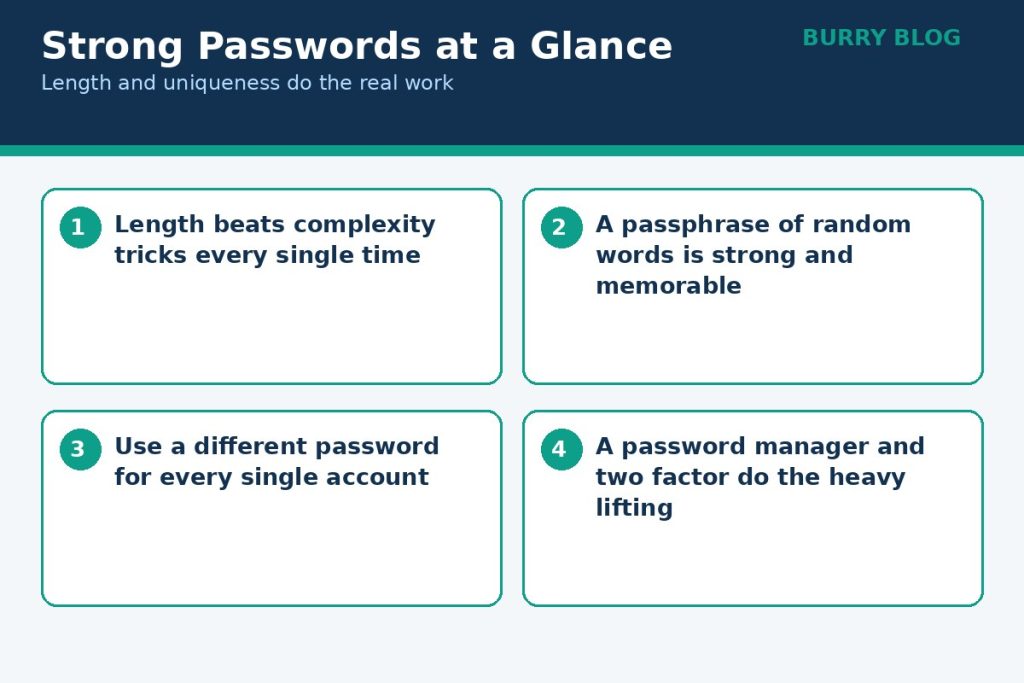
- Aim for at least 16 characters; length does the heavy lifting, not symbol tricks
- Build memorable passwords as a passphrase of 4 to 7 unrelated words
- Every account gets its own unique password; a password manager remembers them
- Turn on multi factor authentication, and use passkeys where offered
In This Guide
- How to Create a Strong Password: Start With Length, Not Tricks
- The Passphrase Method, Step by Step
- The Rules on One Page
- One Password Per Account, Because Reuse Is the Real Danger
- Password Managers, Explained Without the Jargon
- Keep the Device Clean Too
- The Second Layer: MFA and Passkeys
- What to Stop Doing
- Frequently Asked Questions
How to Create a Strong Password: Start With Length, Not Tricks
The old rulebook asked for a capital letter, a number and a symbol, and produced passwords like a favourite word with a digit and an exclamation mark stuck on the end. NIST has dropped that approach, and its FAQ explains why. When people are forced to mix character types, they satisfy the rule in predictable ways, for example by appending an exclamation mark to a word they already use. Attackers know those habits and try them first. NIST gives a neat example in its own guidance: a password can obey every composition rule and still be one of the most common choices on the internet, while a longer, simpler string of words can be far rarer and far stronger.
Length is what does the heavy lifting. Every extra character multiplies the number of guesses an attacker has to make, and words are the easiest way for a human to add characters. That is why NIST tells services to allow passwords of at least 64 characters, so that long passphrases actually fit, and why its current standard asks services to require at least 15 characters when a password is the only thing protecting an account. For your own accounts, CISA’s bar of 16 characters or more is the one to aim at. You do not reach it with symbols. You reach it with words.
The Passphrase Method, Step by Step
A passphrase is a password built from several unrelated words instead of one scrambled word. CISA suggests four to seven unrelated words, and spaces are allowed on many services. The method matters more than any single example, so here it is plainly:
- Pick four or more words that have nothing to do with each other and nothing to do with you. Unrelated is the whole point. A pet’s name plus your street fails both tests.
- Let chance choose them if you can. Open a book at random pages and take the first noun you see, roll dice against a word list, or use the generator inside a password manager. Words you invent on the spot tend to follow your habits, and habits are guessable.
- Join them in the order they came, with spaces or a separator the site accepts.
- Use that passphrase in exactly one place.
An example of the pattern, and only the pattern: four unrelated words such as lantern, bicycle, mango, trumpet, strung together into one long string. Do not use that one. It is printed here, which makes it worthless as a secret, and the same goes for any example in any article, including this one. What you should copy is the shape: several ordinary words, chosen at random, adding up to a password well past 16 characters that you can picture in your head. That picture is why passphrases stick. A short string of symbols gives your memory nothing to hold on to, while four random words form a small absurd scene, and absurd scenes are easy to recall.

The Rules on One Page
| Do | Do not |
|---|---|
| Make every password at least 16 characters | Reuse one good password on several accounts |
| Build the passwords you must memorise from 4 to 7 unrelated words | Build a password from names, birthdays or teams you support |
| Let a password manager generate and store the rest | Keep passwords in a notes file or spreadsheet on your computer |
| Give every account its own unique password | Change passwords on a fixed schedule when nothing has gone wrong |
| Turn on multi factor authentication, starting with email and banking | Rely on security questions whose answers can be looked up |
| Change a password at once if a service reports a breach | Assume a symbol at the end makes a short password strong |
One Password Per Account, Because Reuse Is the Real Danger
If length is the first lesson, uniqueness is the one that saves people in practice. When a website is breached, the stolen email addresses and passwords do not sit idle. They get fed into automated tools that try the same combinations on other sites, a technique called credential stuffing. It works because so many people reuse passwords, and it needs no skill beyond patience and a list.
CISA tells the story of a customer who used the same password for her bank and her email. The password surfaced in a company breach and was posted online. Someone used it to get into her bank, then into her email, so she could not even receive the reset link to take the accounts back. Hours of phone calls followed. One password, used twice, turned a leak at a company she barely remembered into a lockout from the two accounts that mattered most. A unique password for every account is what stops that chain. If each account has its own, a breach at one site hands an attacker a key that opens nothing else.
Password Managers, Explained Without the Jargon
Nobody can memorise a long, random, unique password for every account, and CISA says so outright. Its answer is a password manager: a program that generates strong passwords, stores them in an encrypted vault and fills them in on sites and apps. You memorise one password, the master passphrase for the manager itself, and that is exactly where your best passphrase belongs. Make it the longest one you own, built with the method above.
A few practical points, all drawn from the guidance. NIST’s FAQ notes that password managers make people far more likely to end up with unique, long passwords on every account, and that most can generate them for you, so let the generator do it rather than typing your own. Turn on multi factor authentication for the password manager itself if it offers it, because the vault is a valuable target and deserves the extra lock. NIST also advises avoiding any manager that can recover your master password for you. If the company can hand your master password back, someone else may be able to get it handed over too. And when a stubborn site still asks security questions, NIST suggests a neat trick: generate a random answer with the manager and store that answer in the vault, because the true answers are often guessable, as the next sections explain.
Our Technology section collects more plain English guides like this one. The built in managers in browsers are a reasonable free starting point, and CISA points readers to trusted reviewers such as Consumer Reports when choosing a dedicated program.
Keep the Device Clean Too
Strong passwords protect accounts, but the device you type them on matters too. A slow, cluttered machine that has not been updated in months is a worse home for a password vault than a maintained one, and the fixes are mostly free. Our guide to how to speed up a slow laptop walks through that ordered cleanup, restart and updates first, then startup apps and storage. Do that first if your machine is struggling, then set up the manager on it.
The Second Layer: MFA and Passkeys
A password is something you know. Multi factor authentication asks for something else as well, usually a code from an app or a prompt on your phone, so a stolen password on its own is not enough. CISA’s instruction is simple: enable MFA, especially for your email, social media and financial accounts. Email comes first in that list for a reason. Whoever controls your inbox can reset almost everything else you own.
Passkeys go one step further and replace the password for sign in. Google Account Help explains them plainly: a passkey lets you sign in with your fingerprint, face scan or phone screen lock instead of typing a password. Because a passkey lives on your device and cannot be written down or accidentally given to a scammer, it is far harder to phish than a password, and your fingerprint or face data stays on the device rather than being sent to Google. Google also gives the one caution worth repeating: only create passkeys on devices you personally own and use, because anyone who can unlock that device can use its passkey. Where a service offers a passkey, take it for your most important accounts, and keep MFA switched on everywhere else.
What to Stop Doing
Some habits survive on reputation alone. Changing your password every few months is one of them. NIST’s FAQ states that services should not require passwords to be changed on a schedule, and should only force a change when there is evidence of compromise. Forced rotation backfires: people who know a change is coming choose weaker passwords, then alter them in small predictable ways, like bumping the final number up by one. Change a password when a breach notice, a suspicious sign in alert or your own mistake gives you a reason, and change it properly, to something new and unique, not to a cousin of the old one.
Security questions are another leftover. NIST no longer recognises knowledge based authentication as an acceptable authenticator, because the answers to questions about first schools, mothers’ maiden names and favourite colours can often be discovered, and many questions have only a small set of plausible answers anyway. Where a site still forces them on you, use the generated random answer trick from the manager section and store the answer in your vault.
Finally, the sticky note. CISA’s advice is to use a password manager rather than writing passwords down, and never to save them in a file on your computer. A note stuck to a monitor is the worst of all worlds, readable by anyone who walks past, including visitors and cleaners, and it usually holds the very passwords an office or home network depends on. If paper is genuinely the only workable backup for one master passphrase while you settle in, treat it like a spare house key rather than a reminder note: written in a notebook, kept out of sight in a drawer at home, never photographed, never stored with the device, and replaced by the manager as soon as you are comfortable. That is a compromise for one secret, not a system for all of them.
Frequently Asked Questions
How long should a password be?
Aim for at least 16 characters, which is the minimum CISA recommends, and longer is stronger. NIST’s current standard asks services to require at least 15 characters when a password stands alone and to allow at least 64, specifically so long passphrases fit. A passphrase of four to seven unrelated words clears the bar comfortably.
Is a passphrase really safer than a short password full of symbols?
Yes, according to both CISA and NIST, provided the words are unrelated and chosen at random. Symbols added to a short word follow patterns attackers try first, such as a capital letter at the start and an exclamation mark at the end. Length from several random words gives far more possible combinations and is easier to remember.
Do I need to change my passwords every 90 days?
No. NIST advises against scheduled changes and says a password should be changed when there is evidence it has been compromised, for example a breach notification or suspicious activity on the account. Changing on a calendar tends to produce weaker passwords and small, predictable edits to old ones.
Are password managers safe to trust with everything?
They are the option both CISA and NIST point people to, because the alternative is usually reuse. Protect the vault properly: a long passphrase as the master password, multi factor authentication on the manager itself, and a reputable program, ideally one that cannot recover your master password for you. That combination is far safer than one memorised password stretched across every account.
What is the difference between MFA and a passkey?
Multi factor authentication keeps your password and adds a second check, such as a code or phone prompt, so a stolen password alone is not enough. A passkey replaces the password for that sign in: your device proves who you are when you unlock it with your fingerprint, face or PIN, and there is no password to type, reuse or hand to a fake site.

Written by Danish Ali
Danish covers technology, software and business tools for Burry Blog. He tests how platforms actually work and explains them in plain language, without the marketing gloss.